This coloring application stands out for its focus on relaxation over competition. The gallery offers a nice variety of canine character illustrations, each with enough detail to engage without overwhelming. The toolset is well-chosen, with the glitter effects adding a fun twist. The automatic save feature is a practical touch that respects the player's time. It is a solid choice for anyone looking for a low-stress creative activity.
Description
Artistic Freedom at Your Fingertips
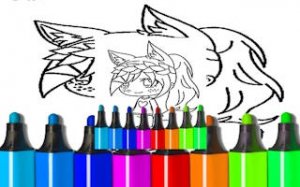
This digital coloring experience places a gallery of anime-style canine illustrations at the player's disposal. Each image presents a unique pose or scene, offering a fresh canvas for color experimentation. The absence of timers or scoring systems encourages a relaxed pace, allowing users to focus entirely on the act of creation. This design philosophy makes the application suitable for both young children exploring color for the first time and adults seeking a calming artistic outlet.
Toolkit for Creative Expression
The software provides a selection of digital tools that mimic traditional art supplies. A brush tool allows for freehand coloring, while a fill option covers larger areas with a single tap. An eraser corrects minor mistakes, and a dedicated undo button provides additional control. For those who wish to start fresh, a reset option clears the canvas entirely. Special effects like glitter and sparkle overlays add a layer of whimsy, enabling users to enhance their artwork with decorative touches.
Designed for All Skill Levels
The interface prioritizes simplicity and accessibility. Large, clearly labeled icons guide users through tool selection and color changes. The gallery is organized for easy browsing, and selecting an image requires only a single tap. This straightforward navigation ensures that even the youngest players can operate the application without frustration. The responsive controls register touch or mouse input accurately, making the coloring process feel smooth and natural.
Progress Without Pressure
An automatic save feature preserves the current state of each artwork. This allows players to close the application and return later to continue where they left off. The system works in the background without interrupting the creative flow. This functionality is particularly useful for complex illustrations that may require multiple sessions to complete. It also supports a stress-free environment, as no artwork is lost due to accidental closure.
Endless Variety and Inspiration
The illustration gallery includes multiple canine characters in different outfits and settings. Some images depict characters in dynamic poses, while others offer simpler compositions suitable for younger children. This variety prevents the experience from feeling repetitive and provides ongoing inspiration. As players progress through the gallery, they encounter new opportunities to experiment with color combinations and techniques. The library may expand over time, offering fresh content for returning users.
Compatibility
💻 Desktop | 📱 Mobile | 📟 Tablet
– All supported · Best with Chrome or Safari
Faq
Is Canine Character Color Art Studio available on mobile devices?
The game is designed to work on both desktop and mobile browsers. Touch controls are fully supported on tablets and smartphones, allowing for direct finger painting. The interface adapts to different screen sizes for a consistent experience.
Does the game require an internet connection to play?
An internet connection is needed to load the initial gallery and save progress. Once an image is loaded, coloring can proceed offline for that session. However, saving changes and accessing new illustrations requires a connection.
Are there any hidden costs or in-app purchases?
No. The application is completely free with no in-app purchases. All tools, effects, and illustrations are available from the start. There are no locked features or premium content that requires payment to access.
Can I share my finished artwork with others?
The game does not include a built-in sharing feature. However, players can take a screenshot of their completed artwork using their device's standard screenshot function and then share it through other apps or social media platforms.
How many illustrations are available in the gallery?
The gallery includes a selection of illustrations that may vary. The exact number is not specified, but it offers enough variety to provide multiple sessions of coloring. New images may be added periodically to keep the experience fresh.
Is the game suitable for children under five years old?
Yes. The simple interface and large touch targets make it accessible for young children. The absence of timers or scores eliminates any pressure. Adult supervision may be helpful for very young users navigating the tool selection.
Player Comments
💬
Sign in to comment
You must be logged in before posting a review or rating.



Player Comments
Sign in to comment
You must be logged in before posting a review or rating.
No account? Create one
No comments yet. Be the first to comment!