Princess Jewelry Design Studio offers a wonderful creative outlet for children. The drag-and-drop controls are intuitive, and the variety of gems, colors, and patterns allows for endless customization. Parents will appreciate the ad-free, safe environment. It encourages fine motor skills and imagination without any pressure. A perfect choice for family fun.
Description
Game Introduction
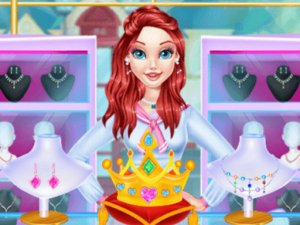
Princess Jewelry Design Studio invites players into the charming world of Ariel, a young princess who loves jewelry. She has opened her own custom jewelry shop, where you can explore endless creativity. From sparkling crowns to elegant pearl necklaces and delicate earrings, every piece is yours to design. This game is perfect for kids and families who enjoy arts and crafts. It encourages imagination and fine motor skills as you choose colors, gems, and patterns. Join Ariel and discover the joy of making jewelry that shines.
How to Play
Start by visiting Ariel's jewelry shop. Select a jewelry item like a crown, necklace, or earrings. Then, choose your favorite colors, gems, and decorations. Drag and drop elements to customize your design. Once you finish, you can save or share your creation. The game uses simple controls, making it easy for young players. Follow the on-screen hints to create stunning pieces. Play again to try new combinations and become a top jewelry designer.
Game Features
Fun and creative jewelry customization for all ages. Simple drag-and-drop controls. Safe, family-friendly environment with no ads or in-app purchases. Encourages creativity and fine motor skills. Save and share your designs with friends and family.
Tips for Success
Experiment with different color combinations to create unique pieces. Try matching gems to the metal color for a polished look. Practice using the drag-and-drop controls to become faster. Look at the on-screen hints for inspiration. Save your favorite designs to show friends and family. Play regularly to discover all the available jewelry options and decorations.
Compatibility
▸ Desktop: Chrome / Edge / Firefox / Safari
▸ Mobile: iOS Safari / Android Chrome
▸ Tablet: iPadOS Safari / Android Tablet Browser
Keep your browser updated for the best experience
Faq
Can I play Princess Jewelry Design Studio on a tablet?
Yes, the game is designed with simple touch controls that work well on tablets and smartphones. The drag-and-drop interface is optimized for touch screens, making it easy for young players to create jewelry on the go.
Is there a way to print my jewelry designs?
The game allows you to save your creations to your device. You can then print them using your device's standard print function. This is a great way to display your artwork or share it with family.
Are there different princess characters to choose from?
The game focuses on Princess Ariel's jewelry shop. While you may encounter other characters as part of the story, the main experience is centered on designing jewelry with Ariel. Additional characters may appear in future updates.
How many jewelry items can I design at once?
You can design one item at a time, but you can save each creation to your collection. There is no limit to how many designs you can save, so feel free to create as many crowns, necklaces, and earrings as you like.
Does the game require an internet connection to play?
Princess Jewelry Design Studio can be played offline after the initial download. An internet connection is only needed to save or share your designs with friends and family. This makes it perfect for travel or areas with limited connectivity.
Can I change the background or setting of my jewelry design?
The game currently offers a fixed background in Ariel's jewelry shop. While you cannot change the background, you can customize the colors, gems, and patterns of your jewelry to create unique pieces. Future updates may include additional backgrounds.
Player Comments
💬
Sign in to comment
You must be logged in before posting a review or rating.



Player Comments
Sign in to comment
You must be logged in before posting a review or rating.
No account? Create one
No comments yet. Be the first to comment!